Cabling is the least glamorous part of any phone or network project and the one you will regret most if it is done badly. Equipment gets replaced every few years; cable in the walls often stays for fifteen or more. Getting it right the first time saves a lot of money and a lot of mysterious “phone problems”.
Key takeaways
- For new office installations, Cat6A is the safest long-term choice for desks, Wi-Fi access points and PoE devices.
- Use fiber for backbones between floors and buildings and for runs longer than 100 m.
- Insist on labeling, certification test reports and as-built documentation.
What “structured” cabling means
Structured cabling is an organized, standards-based system instead of a tangle of ad-hoc cables. In North America it is described by the ANSI/TIA-568 family of standards. A typical system includes:
- Horizontal cabling: from a telecom room to each wall outlet, access point or camera — limited to 90 m of permanent link (100 m total channel including patch cords).
- Backbone cabling: between telecom rooms, floors or buildings — usually fiber.
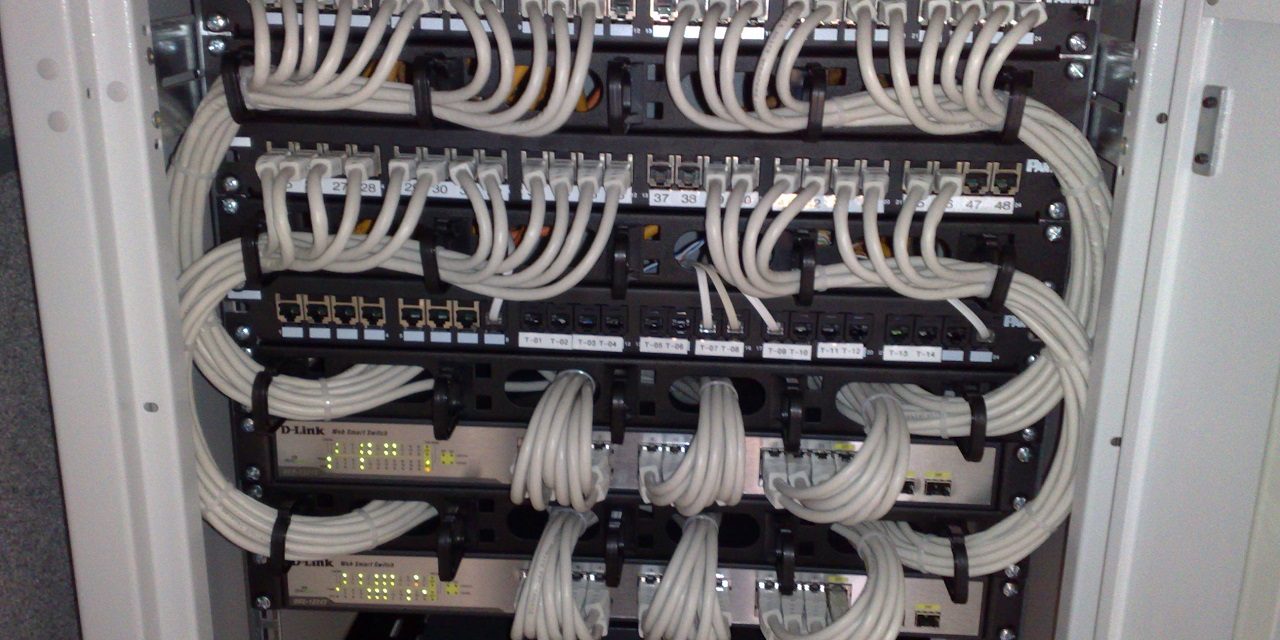
- Telecom rooms and racks: patch panels, cable management, switches and power.
- Work area: outlets and patch cords at desks.
Cat6 vs. Cat6A vs. fiber
| Cat6 | Cat6A | Multimode fiber (OM3/OM4) | Single-mode fiber (OS2) | |
|---|---|---|---|---|
| Bandwidth rating | 250 MHz | 500 MHz | Very high | |
| 10 Gbps distance | Up to ~55 m | Full 100 m | ~300–400 m | Kilometers |
| PoE | Yes | Yes, better heat handling | No (needs separate power) | |
| Cable size | Thinner | Thicker, needs more pathway space | Very thin | |
| Best for | Budget installs, 1 Gbps desks | New offices, Wi-Fi 6/7 APs, PoE cameras | Backbones inside a building | Between buildings, long runs |
Cat5e can still carry 1 Gbps and is fine where it already exists and tests well, but we do not recommend installing it new.
Power over Ethernet and heat
IP phones, wireless access points and security cameras are commonly powered over the same cable that carries their data. Higher-power PoE (IEEE 802.3bt) delivers up to 60–90 W at the switch port, and large bundles of cables carrying power get warm. Warmer cables have higher losses, which can reduce maximum distances. Cat6A’s construction typically handles this heat better — another reason to choose it for new builds with many PoE devices.
Plenum, riser and outdoor cable
- Plenum (CMP): required in air-handling spaces such as many drop ceilings; produces less smoke when burning.
- Riser (CMR): for vertical runs between floors in shafts.
- Outdoor / direct burial: UV-resistant, water-blocking jackets for runs outside or underground.
Local building and fire codes decide what is required. A professional installer will know what your inspector expects.
Designing the layout
How many drops?
Two drops per desk is a common minimum (one for a phone or computer, one spare). Add drops for printers, TVs and conference room equipment, every Wi-Fi access point location, every camera, access control readers and anything else on the network. Cable is cheap during construction and expensive afterwards.
Telecom room
Plan space for racks with front and rear clearance, dedicated power circuits, a UPS, cooling and a secure door. Avoid placing it next to sources of electrical interference or water.
Pathways
Use J-hooks or cable trays every 1.2–1.5 m rather than laying cable on ceiling tiles, keep distance from fluorescent fixtures and power lines, and leave capacity for future cables.
Labeling and documentation
A well-labeled system lets anyone trace a cable in seconds. Follow a consistent scheme — the ANSI/TIA-606 standard is the usual reference — so that each outlet and patch panel port shares the same identifier (for example TR1-A-24: telecom room 1, panel A, port 24). Insist on:
- Labels on both ends of every cable and on every faceplate
- A floor plan showing each outlet ID
- A spreadsheet linking outlet, panel port and switch port
- Photos of racks after installation
Testing and certification
There is a big difference between a cable that “works” and a cable that is certified. A certification tester checks wire map, length, insertion loss, crosstalk (NEXT, PSNEXT), return loss and more against the category standard. Ask for the test report for every link — reputable installers provide it as a PDF. Many cable manufacturers’ extended warranties also require certified links installed by trained contractors.
Common mistakes
- Untwisting pairs too far at the termination point.
- Exceeding the bend radius or crushing cable with tight zip ties (use hook-and-loop straps).
- Running cable alongside electrical power without separation.
- Mixing categories (Cat6 cable with Cat5e jacks).
- Exceeding 90 m permanent link length.
- No spare capacity in pathways or patch panels.
How cabling affects your phones
Many of the “random” VoIP issues we diagnose — phones rebooting, intermittent one-way audio, choppy calls at one desk only — trace back to a damaged or poorly terminated cable. If you are planning a new phone system, check our network readiness guide and consider certifying existing cabling before go-live.
Frequently asked questions
Is Wi-Fi replacing cabling?
No — Wi-Fi access points themselves need cabling, and fixed devices (phones, cameras, printers) are more reliable wired. Faster Wi-Fi actually increases the need for good cable.
How long does an office cabling job take?
A small office with 20–40 drops is often a one- to three-day job. Larger projects are phased by floor.
Can I reuse old Cat5e?
If it tests well and you only need 1 Gbps, yes. Certify it first and replace failing links.
Planning a move or a fit-out?
We design, install, label and certify Cat6/Cat6A and fiber cabling — with test reports for every drop.